
How to File GST as an Upwork Freelancer in India: Invoicing, RCM, and LUT
Upwork is three transactions stacked into one platform — your invoice to the end client, the Upwork commission you pay under RCM, and the bank credit. Get those three threads right and GST filing is a 30-minute job. Get them wrong and you're paying ₹5,000–10,000/month to a CA to clean up the mess.

Freelancer for 10+ years with clients in the USA, Australia, Europe, South Africa and India. Built InvoiceRocket to keep his own invoicing, GST and Section 44ADA tracking in order, and to give his CA everything in one place.
The most common mistake Indian freelancers make on Upwork isn't filing late or filing wrong totals. It's treating the Upwork dashboard as their accounting system. The platform shows you "earnings," "fees," and "available balance" — none of which map cleanly to anything the GST portal asks for.
Under GST, a single Upwork engagement is actually three separate transactions:
- You → end client. An export of services (usually). This is your outward supply.
- Upwork → you. A service fee (and Connects). This is an import of services. You owe GST on it under Reverse Charge Mechanism (RCM).
- Upwork → your bank account. A remittance. This is a cash movement, not a supply.
Mix these up and your GSTR-1 won't reconcile with your bank statement, your RCM will be wrong, and you'll discover both of these problems six months later when you're trying to claim a refund.
This is the practical walkthrough.
TL;DR. Add your GSTIN to Upwork so they stop charging Indian GST on their fee. Raise your own tax invoices — Upwork's are not Rule 46 compliant — one consolidated invoice per client per month, converted at the CBIC notified rate for the invoice date. File your LUT before invoicing exports. Pay 18% IGST under reverse charge, in cash, on Upwork's service fees and Connects; report in GSTR-3B 3.1(d) and reclaim in 4(A)(2). Withdraw once a month, and claim accumulated ITC back via RFD-01.
This is an explainer, not professional tax advice. GST rules and forms change — confirm current procedures on the GST portal or with your CA before filing.
The first thing to do: add your GSTIN to Upwork
Before anything else, go to Upwork → Settings → Tax Information and enter your GSTIN. Once you do this, Upwork stops charging Indian GST on top of their service fee. The fee itself doesn't change — but you no longer pay GST to Upwork on it. You still owe GST under RCM (more on that below), but at least you're not paying GST twice.
If you've been on the platform for a while without adding your GSTIN, that's recoverable but not pretty: you've been paying Upwork's GST and now owe additional GST under RCM on the same fees. Add the GSTIN, then move on.
Invoicing: don't use Upwork's invoices
Upwork generates invoices automatically. They look professional. They are not valid Indian tax invoices.
Under Rule 46 of the CGST Rules, a tax invoice must contain specific fields — your GSTIN, the SAC code, a continuous invoice serial, an LUT declaration if applicable, place of supply with country code, and so on. Upwork's invoices are missing most of these. They're commercial receipts that prove a transaction happened — not tax invoices that satisfy GST.
You must create your own tax invoices for every Upwork transaction. Keep them in the same continuous serial as your direct clients (INV/2026-27/001, INV/2026-27/002, …) — there is no requirement to maintain a separate Upwork series, and a single series makes reconciliation cleaner.
Need an invoice right now that's GST-compliant for export? Use our free GST invoice generator — toggle Export under LUT and the SAC code, currency, place of supply, and declaration line are pre-filled correctly.
Consolidated vs individual invoicing: the "one client, one month" rule
This is the most common question on r/IndiaTax from Upwork freelancers, and the answer in the law is different from the answer in practice.
Strictly speaking, every Upwork milestone is a distinct supply of services and deserves its own tax invoice. If you take this position you'll generate 30–80 invoices a month and your GSTR-1 will be a list of every $20 milestone you ever closed.
Practically, what most CAs accept and most freelancers do: one consolidated invoice per client per month. You list the milestones inside that invoice — date, brief description, amount — and the total matches the sum of remittances you received from that client that month.
Why not a single giant monthly invoice for all of Upwork? Because GST officers reconcile your invoices against your bank credits using the FIRC (Foreign Inward Remittance Certificate). Upwork remits money to your bank in batches that don't always map to a single client. If you have one ₹8 lakh invoice and 14 different bank credits, you'll spend an afternoon explaining the math during scrutiny. One invoice per client per month makes that reconciliation trivial.
The rule of thumb:
| Pattern | What to do |
|---|---|
| Long-running retainer with one client | One consolidated invoice per month |
| Multiple short milestones with the same client in a month | One consolidated invoice per month, listing milestones inside |
| One-off project completed in a single month | One invoice, dated when the project closed |
| Same client spanning multiple months | One invoice per month, not one at the end of the project |
The invoice date should fall within the month you're billing — not the date the milestone was approved on Upwork, which can lag by days.
Currency: invoice in USD, file in INR
You can issue the invoice in USD (or whatever currency the client paid in). For GST filing, you must convert it to INR.
The rate to use: the CBIC notified exchange rate for the date of the invoice. CBIC (Central Board of Indirect Taxes and Customs) publishes notified rates twice a month — they're available on the CBIC website and most invoicing tools auto-fetch them.
What not to use:
- Google's mid-market rate. Wrong for GST.
- Your bank's actual conversion rate on the day you received the money. That's the rate that matters for income tax (you're taxed on what you actually received in INR), but for GST you need the CBIC rate on the invoice date.
- The Upwork-shown conversion. Upwork uses its own internal rate which is neither the CBIC rate nor your bank's rate.
This creates a small but real gap: the INR on your GST invoice will not exactly equal the INR your bank credits. That's expected. Document the rate on the invoice (e.g. "Converted at CBIC rate of ₹83.42/USD as of 14 May 2026") and the discrepancy disappears under audit.
Export of services vs domestic supply
A supply qualifies as an export of services under GST only if all five conditions in Section 2(6) of the IGST Act are met — supplier in India, recipient outside India, place of supply outside India, payment in convertible foreign exchange, and supplier and recipient are not just two arms of the same entity.
For Upwork, the trap is this: the recipient is the end client, not Upwork. Upwork is an intermediary platform. Your invoice goes to the end client, your "export of services" status depends on where that client is, and your FIRC will eventually need to show foreign currency landing in your bank.
So:
| End client location | Treatment |
|---|---|
| US, UK, EU, Canada, Australia (anywhere outside India) | Export of services. Zero-rated under LUT. No IGST charged. |
| India (same country) | Domestic supply. You must charge 18% GST even if the client pays in USD through Upwork. LUT does not apply. |
| India but client paid in USD via Upwork | Still domestic. The currency the payment moved in does not change the place of supply. |
This last row catches people. If your "Upwork client" is actually a company in Bangalore who chose to hire and pay through Upwork, that's a domestic B2B supply for you. You owe 18% GST on it (your client can claim ITC, but you must collect and remit). Check the client's country in your Upwork contract details, not the currency.
File your LUT before invoicing exports
If you're invoicing foreign clients (the common case), you need a Letter of Undertaking (LUT) filed for the current financial year. Without it, you'd have to charge 18% IGST on exports and chase a refund for 60–180 days. With it, you invoice at 0% and keep the cash.
LUT is a 10-minute filing on the GST portal, free, valid for one financial year. Renew every April. We have a full LUT walkthrough here.
RCM on Upwork service fees and Connects
Now the part that confuses everyone.
Upwork is a foreign service provider. When they charge you a 10% service fee or sell you Connects, they're providing a service from outside India to a recipient in India — which means you, as the recipient, owe IGST under reverse charge on those fees. Not Upwork. You.
The rate is 18%. The mechanics:
| Step | What happens |
|---|---|
| 1. Calculate RCM | 18% of (Upwork service fees + Connect spend) for the month, converted to INR at the CBIC rate |
| 2. Pay it in cash | Via challan, into the IGST ledger. You cannot use existing ITC to pay RCM — it must be cash |
| 3. Report it | GSTR-3B Table 3.1(d) — "Inward supplies (liable to reverse charge)" |
| 4. Claim it back | Same return, Table 4(A)(2) — "Import of services" |
| 5. Self-invoice | Generate a self-invoice for the RCM transaction. Report serial numbers in GSTR-1 Table 13 — "Documents issued during the tax period" — under "Invoices for inward supply from unregistered person" |
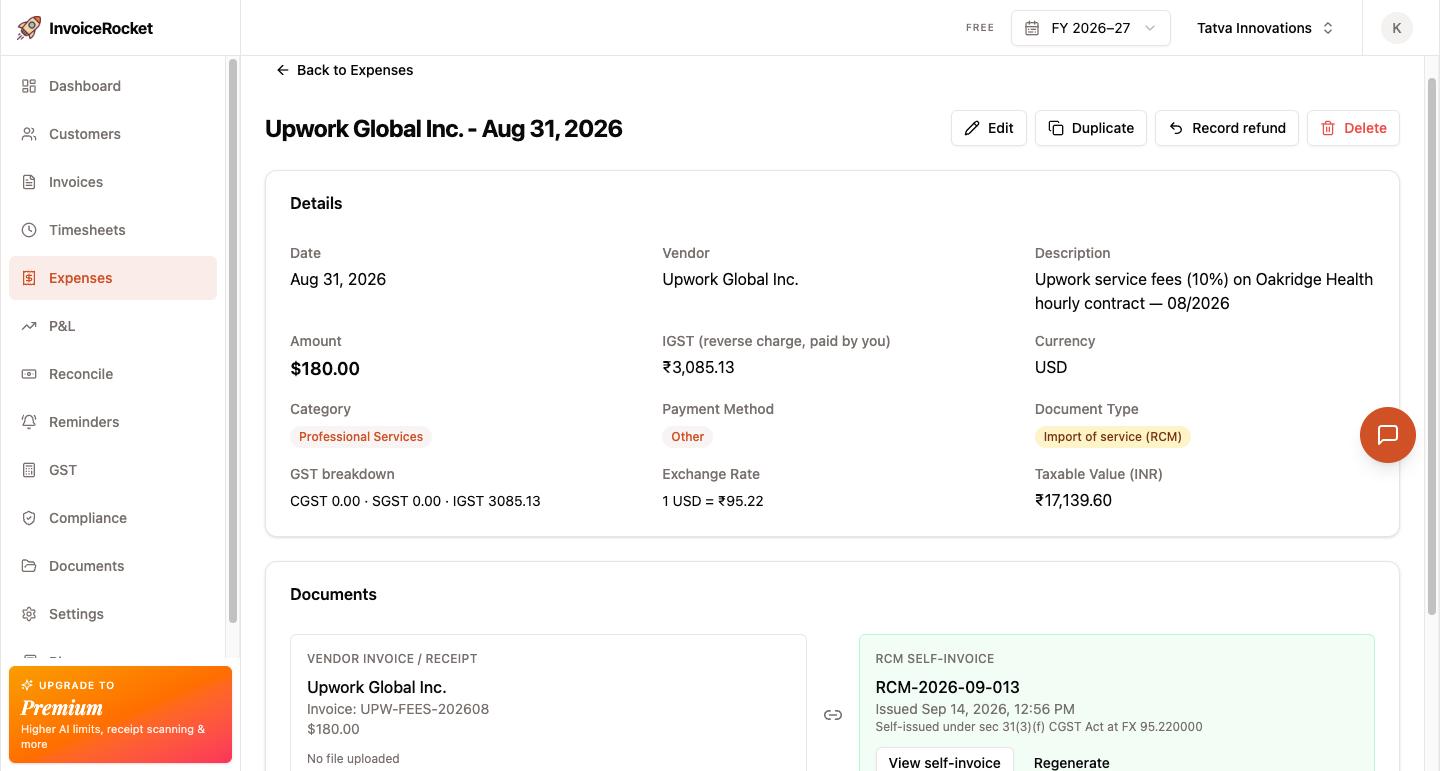
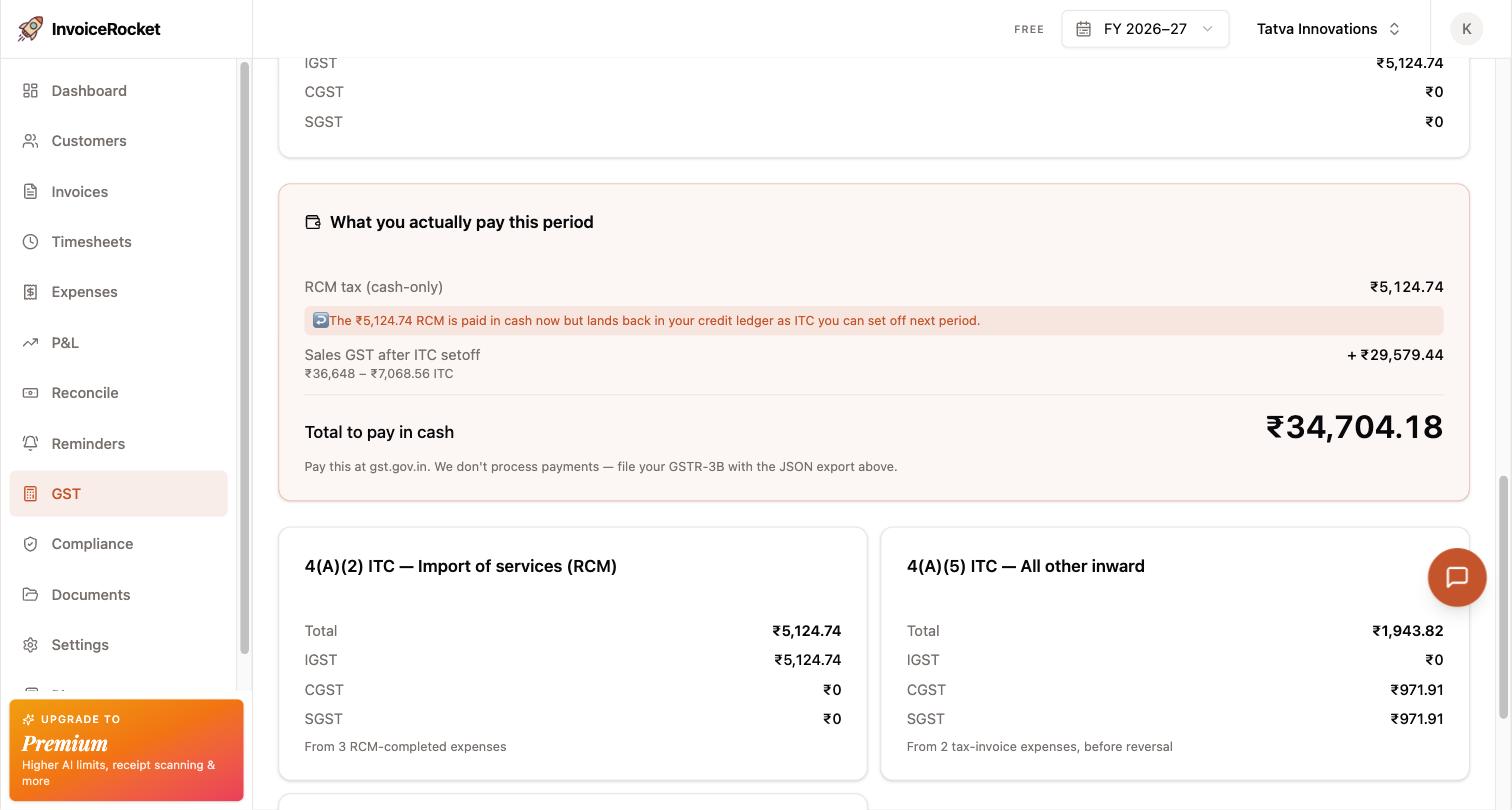
The end result for a freelancer with output tax of zero (because LUT) and RCM of ₹3,000 in a month: you pay ₹3,000 cash, claim ₹3,000 ITC, and end up with ₹3,000 sitting in your electronic credit ledger that you can't immediately use. That credit accumulates month after month — and you reclaim it via the refund process below.
For one ten-second sanity check that you got the RCM math right: if Upwork shows you "service fees: $300" for the month, you owe roughly 0.18 × 300 × ₹83 ≈ ₹4,500 in RCM. That's the number going into 3.1(d).
The refund: getting your accumulated ITC back
Because your output tax is zero (exports under LUT) and you're paying RCM in cash each month, your ITC credit just keeps growing. To pull that cash back out of the GST ledger and into your bank account:
- File Form RFD-01 — Refund of unutilized ITC on account of exports under LUT.
- Attach the invoices, FIRCs, and a CA certificate (required above a threshold; most freelancers don't hit it).
- Wait 30–60 days for the refund to land.
Most freelancers file RFD-01 once a quarter or once a year rather than every month — the paperwork-to-refund ratio doesn't justify monthly filings unless your RCM is large. Set a quarterly reminder.
What to save every month
If GST scrutiny ever lands, the documents that prove your filings was correct are:
- Your own tax invoices (one per client per month, in a continuous serial)
- Upwork's transaction history for the month — exportable as CSV from Upwork → Reports → Transactions
- Upwork's fee statement / billing history — proves the commission amount you paid RCM on
- FIRC or eFIRC from your bank — proves the foreign currency leg of every remittance
- Bank credit advice — the actual INR landing in your account
- CBIC rate screenshots or notification PDFs — for the rate you used on each invoice
Most banks now issue eFIRC automatically — log into your bank's portal monthly and download them. Save everything in a folder organised by financial year. The freelancers I see getting hit hardest in scrutiny are the ones whose Upwork records and bank records can't be tied to each other.
Where it goes wrong — common mistakes
Treating Upwork's invoice as your invoice. Upwork's auto-generated invoice is not a Rule 46 tax invoice. Create your own.
Invoicing Upwork instead of the end client. Your export of services is to the end client. Upwork is the payment rail, not the recipient. Invoice the client by name; reference the Upwork engagement in the description.
Not adding GSTIN to Upwork. You pay GST on the fee twice — once to Upwork as part of their charge, once to the GST department under RCM. Fix this today.
Forgetting RCM on Connects. Connects are a separate purchase from service fees, but the RCM treatment is identical. Add them to your monthly RCM calculation.
Skipping the self-invoice for RCM. Under GST, every transaction needs an invoice — including the import you're self-declaring. Most invoicing tools can auto-generate the self-invoice when you log an Upwork fee.
Treating Indian Upwork clients as exports. If the end client is in India, it's a domestic supply at 18% GST regardless of payment currency. Check the client's country, not the dollar sign.
Using Google's exchange rate. CBIC notified rate on the invoice date. Anything else is wrong for GST.
Mixing up Table 4(A)(2) and 4(A)(3) in GSTR-3B. RCM you pay on Upwork's fees is an import of services, so the credit goes in 4(A)(2) — "Import of services". 4(A)(3) is for reverse charge on purchases from Indian suppliers (an advocate's fees, GTA freight), and 4(A)(1) is for imported goods. Reporting in the wrong row usually won't cost you the credit, but it's an avoidable mismatch to explain later.
When and how much to withdraw from Upwork
Upwork's withdrawal screen shows you a balance and a button. The GST-relevant question is how often you press it, and for how much.
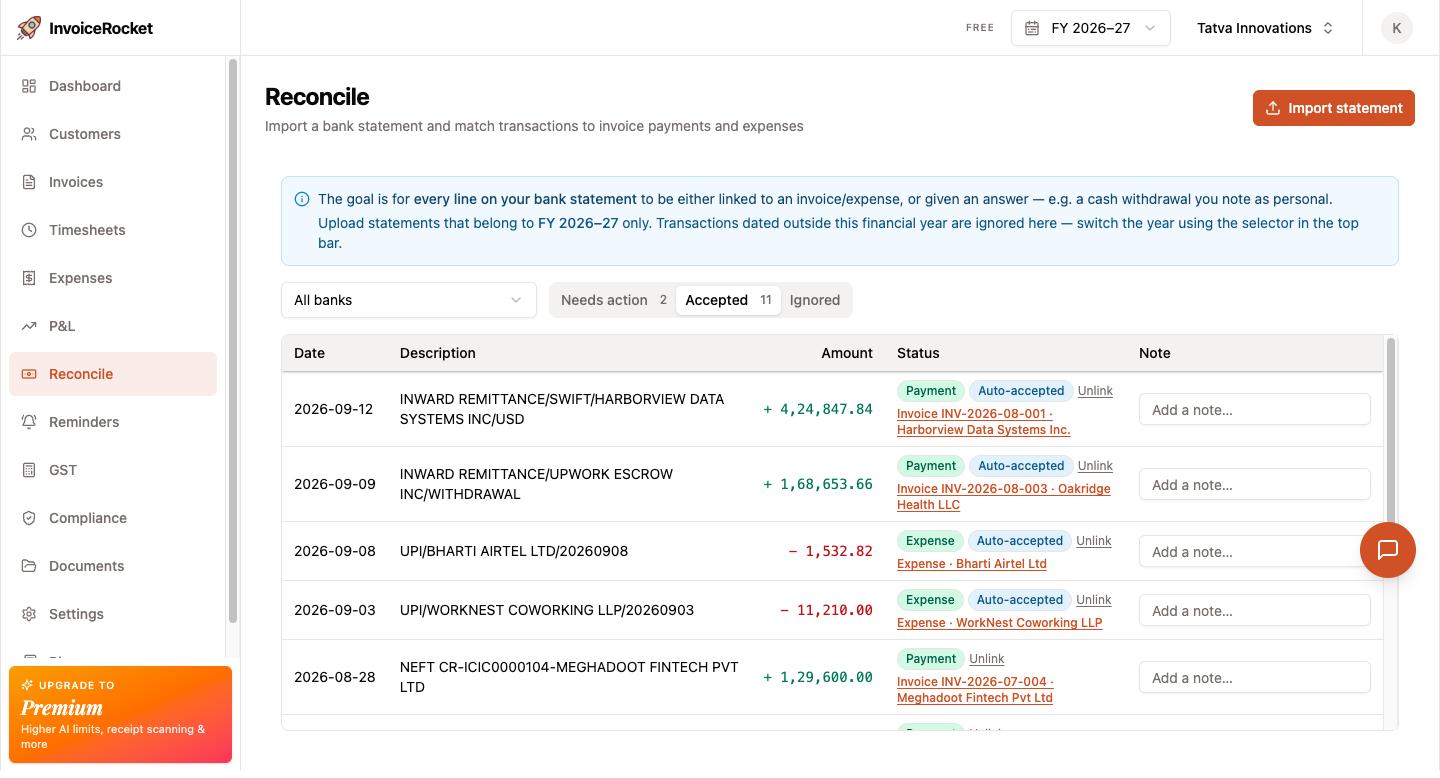
The rule: one withdrawal per month, full available balance. Match your withdrawal cadence to your invoice cadence. One invoice per client per month + one withdrawal per month = one FIRC per withdrawal. Reconciliation during scrutiny becomes a sum check ("invoices in May totalled $X, FIRCs for May totalled roughly $X"), not a forensic exercise. Anything more frequent or less frequent than monthly makes that mapping noisier.
Why not daily or weekly
Every Upwork → bank transfer generates a separate FIRC. Withdraw daily and you'll have 20–30 FIRCs/month to download, organise, and tie to invoices — for no benefit. The per-withdrawal fee piles on too: Direct to Local Bank costs $0.99 per withdrawal, so daily withdrawals burn ~$30/month against $0.99/month for monthly withdrawals. You're paying for the privilege of doing more paperwork.
Why not quarterly or annual
Holding a large balance on Upwork has three real costs:
- FX exposure. You're locked into whatever Upwork's internal conversion rate is on the day you finally withdraw. The longer you wait, the more rate movement you absorb — and you have no control over the rate or the date.
- FEMA hygiene. Under RBI/FEMA, export proceeds are expected to be realised in India within 15 months of the invoice (nine months for invoices before 1 October 2026). A sitting Upwork balance isn't a strict violation (the funds are still in your name), but it's the kind of thing that's awkward to explain if a question ever lands.
- FIRC dates drift from invoice dates. If you invoice in May and withdraw in September, your May invoice gets paired with a September FIRC. The linkage still exists, but you've now added "explain the four-month gap" to every reconciliation.
How much: everything available
Don't try to keep a "working balance" on Upwork. The only legitimate reason to hold funds is a pending dispute — and Upwork already reserves the disputed amount automatically. Withdraw the rest.
Timing within the month
Upwork places a security hold on each milestone before it becomes "available" — typically five days from approval. Plan the withdrawal so the last milestone of the month has cleared the hold:
- If your last milestone of the month is approved on the 25th, it becomes available around the 30th — withdraw on the 1st–5th of the next month.
- Your FIRC will be dated early in the following month while the invoice is dated within the billed month. That's fine: month-end vs. month-start divergence is expected and easy to reconcile. What you want to avoid is an October withdrawal covering May, June, and July invoices.
Pick a calendar day — say, the 5th of every month — and set a reminder. Withdrawal cadence is trivial when it's a habit and miserable when it isn't.
A realistic monthly cadence
If you do this from scratch every month, it'll take three to five hours, and you'll hate it by month three. If your invoicing tool tracks Upwork transactions as a source, it's closer to thirty minutes.
Either way, the cadence, in order:
- 1st–5th of the new month — withdraw the full available Upwork balance. This kicks off the bank credit so the FIRC is ready when you need it.
- Pull Upwork's transaction CSV for the closed month (Upwork → Reports → Transactions).
- Generate one invoice per client covering all milestones in that month, converted at the CBIC rate for the month-end date.
- Generate one self-invoice for the month's Upwork fees + Connects — the RCM transaction.
- Download FIRCs from your bank once the remittance has credited (usually 2–4 days after withdrawal).
- File GSTR-1 by the 11th (monthly) or 13th of the quarter-end month (QRMP). See our GSTR-1 / GSTR-3B checklist for the table-by-table walk-through.
- Pay RCM in cash, file GSTR-3B by the 20th (monthly) or 22nd/24th (QRMP).
- Quarterly: file RFD-01 to refund the accumulated ITC.
How much of this can software just do
Honestly, most of it. The pieces that are mechanical and rule-based:
- Pulling Upwork transactions and mapping them to clients
- Generating one tax invoice per client per month with the right SAC, LUT declaration, and CBIC rate
- Generating the RCM self-invoice
- Filling out the GSTR-1 export table and GSTR-3B Table 3.1(d) / 4(A)(2) JSON
- Tracking FIRCs against invoices
- Reminding you to file LUT in April and RFD-01 quarterly
If you want that built in, InvoiceRocket is designed for exactly this: Indian freelancers exporting services, with LUT-aware invoices, FIRC tracking, RCM self-invoice generation, and GSTR-ready exports. Free for most freelancers.
The honest summary: Upwork makes the work easy and the GST hard. The platform's UI shows you the wrong abstractions for Indian tax law. Once you internalise the three-transaction model — your invoice to the client, the RCM on Upwork's fee, the bank credit — everything else is just paperwork on a schedule.
Frequently asked questions
Can I use Upwork's invoices for GST?
No. Upwork's auto-generated invoices are commercial receipts that prove a transaction happened — they are not Rule 46 tax invoices. They're missing your GSTIN, the SAC code, a continuous invoice serial, the LUT declaration, and place of supply with country code. You must raise your own tax invoices for every Upwork transaction.
Should I raise one invoice per Upwork milestone?
Strictly, every milestone is a distinct supply of services and deserves its own invoice — which would mean 30–80 invoices a month. In practice, what most CAs accept is one consolidated invoice per client per month, listing the milestones inside it, with the total matching the remittances you received from that client that month. That keeps invoice-to-FIRC reconciliation trivial during scrutiny.
Which exchange rate do I use for Upwork income under GST?
The CBIC notified rate for the date of the invoice. Not Google's mid-market rate, not your bank's actual conversion rate on the day the money landed (that one matters for income tax, not GST), and not Upwork's internal conversion. Document the rate on the invoice itself and the gap between invoice INR and bank INR stops being a problem under audit.
Do I owe GST on Upwork's service fees?
Yes — 18% IGST under reverse charge. Upwork is a foreign service provider supplying a recipient in India, so the liability sits with you, not them. It must be paid in cash (you can't use existing ITC), reported in GSTR-3B Table 3.1(d), and claimed back in the same return under Table 4(A)(2). Connects are a separate purchase but the RCM treatment is identical.
What if my Upwork client is based in India?
It's a domestic supply and you must charge 18% GST, even if they paid in USD through Upwork. The currency the payment moved in does not change the place of supply. Check the client's country in your Upwork contract details rather than assuming the dollar sign means export.
Why should I add my GSTIN to Upwork?
Go to Upwork → Settings → Tax Information and enter it. Once you do, Upwork stops charging Indian GST on top of their service fee. Without it you effectively pay GST twice on the same fee — once to Upwork inside their charge, and again to the department under reverse charge.
How do I get my accumulated ITC back?
File Form RFD-01 — refund of unutilized ITC on account of exports under LUT — attaching your invoices, FIRCs, and a CA certificate if you're above the threshold (most freelancers aren't). The refund lands in 30–60 days. Most freelancers file this quarterly or annually rather than monthly, since the paperwork-to-refund ratio doesn't justify monthly filing unless your RCM is large.
How often should I withdraw money from Upwork?
Once a month, taking the full available balance, so that one withdrawal maps to one FIRC and matches your invoice cadence. Daily or weekly withdrawals generate 20–30 FIRCs a month to reconcile and burn roughly $30/month in $0.99 withdrawal fees. Quarterly or annual withdrawals expose you to Upwork's conversion rate on a date you don't control, and drift your FIRC dates away from your invoice dates.